# Load the tidyverse package
# We'll need this to plot and summarize the data!
library(tidyverse)

# Read in the Dear Abby data
abby <- read_csv("https://mac-stat.github.io/data/dear_abby.csv")2 Univariate analysis
Announcements etc
SETTLING IN
- Per class policy, put away cell phones and clear your laptop of everything except RStudio and the online course manual. Why? It’s better for your learning, for the learning of those around you, building community, etc
- Sit in groups of 3-4. Your group should include:
- NOBODY you sat with last time
- at least 1 person who has used RStudio before this semester
- Meet each other! Be ready to introduce each other when I walk around the room. (Take notes if you need to!)
- Share your names, pronouns, major / minor.
- Discuss what classes you’re taking / how the first days of class went.
- Help each other get ready to take notes!
- Open the online manual to the “Course Schedule” and click on today’s activity. That brings you here!
- Download “02-univariate-notes.qmd” and open it in RStudio. Read the “Organizing your files” directions at the top of the file!!
WRAPPING UP
Please:
Visit office hours! It would be highly unusual to never have a question or to never need help. Myself and the preceptors are here to support you. Check the dates, times, and locations on the calendar at the top of Moodle.
Consider joining the MSCS community listserv (directions here). This is where the Mathematics, Statistics, and Computer Science department (MSCS) shares student-related information about department events, internship opportunities, etc.
- NOTE: You must be signed into your Macalester email.
Upcoming due dates:
- Tuesday
- CP 2 (10 minutes before your section)
- Thursday
- CP 3 (10 minutes before your section)
- PP 1. Start today! This is not designed to finish in 1 sitting. If you start the day before it’s due, or later, you will not finish on time.
Organize your files
This qmd file is where you’ll type notes, code, etc. Directions:
- Take notes in whatever way is best for you. You won’t hand them in.
- Save this file in the “Activities” sub-folder of the “STAT 155” folder you created before today’s class. Use a file name related to the activity number and/or today’s date (eg: “activity 2” or “2 univariate analysis”).
- “Render” the qmd into an HTML file using the button in the menu bar at the top of this file. Scroll through and check out how the qmd and HTML correspond. Neat!
- For Practice Problem sets and other assignments, you’ll need to submit an HTML file. Let’s practice finding & checking that file.
- Find this HTML in your laptop files (not in RStudio). To find it, navigate to the “Activities” sub-folder within your “STAT 155” folder (or wherever you saved the qmd).
- Open the HTML. It will pop up in your browser instead of within RStudio.
- Make sure the HTML is correctly formatted.
Learning goals
- Code
- Review basic functionality of RStudio.
- Learn about the pipe function
%>%.
- Explore various numerical and visual summaries for a single variable of interest. Understand how to…
- identify appropriate univariate visual & numerical summaries, depending upon the type of variable, quantitative or categorical.
- obtain univariate numerical & visual summaries in R.
- interpret univariate numerical & visual summaries.

Additional resources
Required videos
- Quarto docs
- Univariate summaries (slides)
Optional
- Reading: Sections 2.1-2.4, 2.6 in the STAT 155 Notes
- Videos:
Warm-up
Guiding question
What anxieties have been on Americans’ minds?
Context
Dear Abby is America’s longest running advice column. Started in 1956 by Pauline Phillips under the pseudonym Abigail van Buren, the column continues to this day under the stewardship of her daughter Jeanne. We’ll explore the contents of these letters!
EXAMPLE 1: Background
The Pudding, a data journalism site, published a visual article called 30 Years of American Anxieties exploring themes in Dear Abby letters from 1985 to 2017. Check out what they explored.
Go to the “Data and Method” section at the very end of the article. In thinking about the 5 W’s + H (who, what, when, where, why, and how) of data context, what concerns/limitations surface with regards to using this data to learn about concerns over the decades?
REMINDER: RStudio = a hammer, You = a carpenter
During the first few weeks of the semester, you will learn most of the code we’ll need for this class. It will be a lot and will be distracting! And you’ll make so many mistakes (which is necessary to learning). Throughout, remember:
RStudio = a hammer (simply a tool needed for statistical modeling that you’ll learn through lots of practice, trial, and error)
You = a carpenter (somebody with knowledge about designing statistical models that are useful and correct)
EXAMPLE 2: Import the data
Let’s import the Dear Abby data collected by The Pudding:
Throughout this activity, we’ll work only with the most recent year of data, from 2017:
# Wrangle the Dear Abby data
# Ignore this code for now!
abby <- abby %>%
  filter(year == 2017) %>%
  mutate(month = month(month, label = TRUE)) %>%
  mutate(
    parents = str_detect(question_only, "mother|mama|mom|father|papa|dad"),
    marriage = str_detect(question_only, "marriage|marry|married"),
    money = str_detect(question_only, "money|finance")
  ) %>%
  rowwise() %>%
  mutate(
    themes = c(
      if (parents) "parents",
      if (marriage) "marriage",
      if (money) "money"
    ) %>% paste(collapse = ", "),
    themes = ifelse(themes == "", "other", themes)
  ) %>%
  ungroup() %>%
select(year, month, day, question_only, bing_pos, themes)- Pull up the
abbydataset from the Environment tab. The variables are:year,month,day: datequestion_only: contents of the letter to Dear Abbybing_pos: sentiment of the letter as measured by the proportion of the words that are positive (0-1)themes: general themes of the letter (among the list that we defined)
- In this tidy dataset:
- rows
The cases or units of observation are single questions or letters. - columns
We have multiple quantitative variables (eg:bing_pos,year) and multiple categorical variables (eg:month,themes)
- rows
EXAMPLE 3: Get to know the data using R code
# How many cases & variables are there?


# Print out the first 6 rows


# Print out the first 10 rows


# Print out the variable / column labels
REFLECTION: Code = communication
We used # above to comment our code. This provides critical signposts for our future selves and others.
EXAMPLE 4: Streamlining code with pipes
Compare the code & output in the following 2 chunks:
# Apply the head() function to the abby data
head(abby)
# Pipe the abby data into the head() function
abby %>%
head()Compare the code & output in the following 2 chunks:
# Apply the dim() function to the head() function to the abby data
dim(head(abby))
# Pipe the abby data into the head() function
# Then pipe that into the dim() function
abby %>%
head() %>%
dim()The second chunks use the pipe function %>%:
object %>% function()is the samefunction(object)Pipes allow us to build and communicate our code in a sequential, logical order.
EXAMPLE 5: Data wrangling with select and summarize
We’ll typically need to wrangle our data throughout an analysis. We’ll use two wrangling “verbs” or functions from the tidyverse today: select() and summarize(). Don’t worry about memorizing anything – just take note of how each function works & what output it produces.
# ???
# NOTE: We're including head() just to check things out.
# Otherwise, all of the rows would be printed in your rendered HTML!
abby %>%
  select(themes, bing_pos) %>%
  head()
# ???
abby %>%
summarize(mean(bing_pos))# ???
abby %>%
summarize(mean = mean(bing_pos, na.rm = TRUE))
EXAMPLE 6: Exploring themes & sentiment
Now that we have a sense for the structure of the data, let’s explore the trends, variability, and patterns in the themes and sentiments (bing_pos) of the Dear Abby questions:
abby %>%
  select(themes, bing_pos) %>%
head()- What numerical summaries might be useful for the
themesvariable?- mean and median
- variance and standard deviation
- a table of counts
- What visual summaries might be useful for the
themesvariable?- histogram
- density plot
- boxplot
- bar plot
- What numerical summaries might be useful for describing the central tendency of
bing_posoutcomes across the Dear Abby questions?- mean and median
- variance and standard deviation
- a table of counts
- What numerical summaries might be useful for describing the spread / variability in
bing_posoutcomes from question to question?- mean and median
- variance and standard deviation
- a table of counts
- What visual summaries might be useful for the
bing_posvariable?- histogram
- density plot
- boxplot
- bar plot
NOTE
Below is an example of a “math box”. You are not required to memorize, nor will you be assessed on, any formulas presented in this or any future math box. They serve 3 purposes:
- To emphasize that there’s “math” / a formal structure behind what we’re doing.
- To provide students that plan to continue studying Statistics a glimpse into the formal statistical theory they’ll explore in later courses.
- To make happy the students that are simply interested in math!
MATH BOX: Univariate numerical summaries
Let \((y_1, y_2, ..., y_n)\) be a sample of \(n\) data points.
mean: \[\overline{y} = \frac{y_1 + y_2 + \cdots + y_n}{n} = \frac{\sum_{i=1}^n y_i}{n}\]
variance: \[\text{var}(y) = \frac{(y_1 - \overline{y})^2 + (y_2 - \overline{y})^2 + \cdots + (y_n - \overline{y})^2}{n - 1} = \frac{\sum_{i=1}^n (y_i - \overline{y})^2}{n - 1}\]
standard deviation: \[\text{sd}(y) = \sqrt{\text{var}(y)}\]
Exercises
DIRECTIONS
You’ll work on these exercises in your groups. Collaboration is a key learning goal in this course.
Why? Discussion & collaboration deepens your understanding of a topic while also improving confidence, communication, community, & more. (eg: Deeply learning a new language requires more than working through Duolingo alone. You need to talk with and listen to others!)
How? You are expected to:
- Use your group members’ names & pronouns. It’s ok to ask if you don’t remember!
- Actively contribute to discussion. Don’t work on your own.
- Actively include all other group members in discussion.
- Create a space where others feel comfortable sharing ideas & questions.
We won’t discuss these exercises as a class. With that, when you get stuck:
- Carefully re-read the problem. Make sure you didn’t miss any directions – it can be tempting to skip words and go straight to an R chunk, but don’t :).
- Discuss any questions you have with your group.
- If the question is unresolved by the group, ask the instructor!
- Remember that there are solutions in the online manual, at the bottom of the activity.
Exercise 1: Categorical variable summaries
Let’s explore the themes in the Dear Abby letters. Since themes is a categorical variable, a simple numerical summary is provided by a table of counts:
# Construct a table of counts
abby %>%
  count(themes)
# Arrange the table of counts in descending order
abby %>%
count(themes) %>%
arrange(desc(n))We can visualize this table of counts using a bar plot. Separately run each chunk below and add a comment (#) about what you observe. The goal isn’t to memorize the code, but to start observing patterns in how the code works.
# ???
abby %>%
  ggplot(aes(x = themes))
# ???
abby %>%
ggplot(aes(x = themes)) +
geom_bar()# ???
abby %>%
ggplot(aes(x = themes)) +
geom_bar() +
theme(axis.text.x = element_text(angle = 90, vjust = 0.5, hjust=1))Reflection
Describe what you learned about the themes. For example, after “other”, what are the 2 most common themes (or combination of themes)? The least common?
Exercise 2: Numerical summaries for quantitative variables
Next let’s explore the quantitative bing_pos variable which measures the sentiment of each question to Dear Abby. Fill in the code to calculate some numerical summaries:
# What's a typical sentiment?
# Calculate the mean & median (measures of central tendency)
___ %>%
  ___(mean = mean(___, na.rm = TRUE),
      median = median(___, na.rm = TRUE))
# How varied are the sentiments?
# Calculate the min, max, & sd (measures of spread)
___ %>%
___(minimum = min(___, na.rm = TRUE),
maximum = max(___, na.rm = TRUE),
stdev = sd(___, na.rm = TRUE))# What's the range of the middle 50% of sentiments, i.e. the interquartile range (IQR)?
# Calculate the 25th and 75th percentiles (i.e. 1st and 3rd quartiles)
abby %>%
summarize(first_q = quantile(bing_pos, 0.25, na.rm = TRUE),
third_q = quantile(bing_pos, 0.75, na.rm = TRUE))
Exercise 3: Visualizing a quantitative variable – boxplots
Let’s complement the numerical summaries with visual summaries of bing_pos. Before class, you learned about 3 possible visualizations for quantitative variables: boxplots, histograms, and density plots. Let’s start with a boxplot. Separately run each chunk below and add a comment (#) about what you observe.
# ???
abby %>%
  ggplot(aes(x = bing_pos))
# ???
abby %>%
ggplot(aes(x = bing_pos)) +
geom_boxplot()Reflection
Make sure that you can connect the boxplot to 5 of your numerical summaries from the previous exercise:
- minimum = 0
- 25th percentile = 0.167
- median = 0.333
- 75th percentile = 0.5
- maximum = 1
Exercise 4: Visualizing a quantitative variable – histograms
Build a histogram of the bing_pos variable:
abby %>%
  ggplot(aes(x = bing_pos)) +
  geom_histogram()
FOLLOW-UP QUESTION
Roughly, what was the most common range of bing_pos scores (i.e. the range with the highest bar)? Roughly how many letters scored in this range?
Exercise 5: Visualizing a quantitative variable – density plots
Using the code for other plots as a guide, try to make a density plot of the bing_pos variable:
# Density plotFOLLOW-UP QUESTION
This density plot is somewhat tri-modal, having 3-ish peaks. These 3 peaks signal that there might be 3 common types of Dear Abby letters. How would you “classify” or “label” these 3 types of letters?
Exercise 6: What did we learn about sentiment?
Part a
You’ve built various numerical and visual summaries of bing_pos. In words, summarize what you these tell us about the sentiment of questions to Dear Abby. Be sure to weave in information about:
- central tendency (typical sentiment)
- spread (variability in sentiments)
- shape of the distribution
- any outliers you observe
Part b
Each of the 3 visualization approaches has pros and cons.
What is one pro about the boxplot in comparison to the histogram and density plot?
What is one con about the boxplot in comparison to the histogram and density plots?
In this example, which plot do you prefer and why?
Exercise 7: Customizing plots
Color is one of many ways to customize a plot. It can be an effective tool (e.g. to highlight key features or to align a plot with the aesthetics of a report). It can also be simply gratuitous and distracting. Play around with the following chunks!
# Recall our histogram
abby %>%
  ggplot(aes(x = bing_pos)) +
  geom_histogram()
# What does "color" do?
# Is this useful or gratuitous?
abby %>%
ggplot(aes(x = bing_pos)) +
geom_histogram(color = "white")# What's the difference between "color" and "fill"?
# Is this useful or gratuitous?
abby %>%
ggplot(aes(x = bing_pos)) +
geom_histogram(color = "blue", fill = "orange")# How do you think "color" and "fill" will work on the density plot?
# Try it! Modify the code below.
abby %>%
ggplot(aes(x = bing_pos)) +
geom_density()# Check out the full set of colors: https://r-charts.com/colors/
# Pick 2 of them for your color and fill
abby %>%
ggplot(aes(x = bing_pos)) +
geom_density(color = "___", fill = "___")
Exercise 8: Looking ahead
In this activity, you explored Dear Abby data, focusing on one variable at a time: themes then sentiments (bing_pos). What further curiosities do you have about the data? Specifically, what relationships between the variables in the abby dataset might be interesting to explore?
Reflection
Learning goals
Go to the top of this file and review the learning goals for today’s activity.
- Which do you have a good handle on?
- Which are struggling with? What feels challenging right now?
- What are some wins from the day?
Code
In addition to exploring the learning goals, you learned some new code.
If you haven’t already, you’re highly encouraged to start tracking and organizing new code in a cheat sheet (eg: a Google doc). This will be a handy reference for you, and the act of making it will help deepen your understanding and retention.
Reflect upon the
ggplot()function.- First, think about the first set of lines:
___ %>% ggplot(aes(x = ___))- What does this first set of lines produce?
- What information goes into the first argument (set of blanks)?
- What information goes into the second argument,
x? - What do you think
aesis short for?
- Next, think about the next set of lines:
___ %>% ggplot(aes(x = ___)) + ___- What’s the purpose of putting a
+at the end of theggplot()line? - Why do you think we’re using
+instead of%>%? - What’s the purpose of the next line (the one that comes after the
ggplot()line?
- What’s the purpose of putting a
- First, think about the first set of lines:
Extra practice
You’re highly encouraged to work on some extra practice problems, either during or after class.
Exercise 9: Import and get to know the weather data
Daily weather data are available for 3 locations in Perth, Australia. A codebook is here.
# Import the data and name it "weather"
___ <- ___("https://mac-stat.github.io/data/weather_3_locations.csv")
Now check out the basic features of the weather data:
# Examine the first six cases

# Find the dimensions of the data
What’s the unit of observation in this data, i.e. what does a “case” represent?
Exercise 10: Exploring rainfall
The raintoday variable contains information about rainfall.
- Is this variable quantitative or categorical?
- Create an appropriate visualization of
raintoday. - Compute appropriate numerical summaries of
raintoday. - Reflect on the correspondence between the visual and numerical summaries.
- What do you learn about rainfall in Perth?
# Visualization

# Numerical summaries
Exercise 11: Exploring temperature
The maxtemp variable contains information on the daily high temperature.
- Is this variable quantitative or categorical?
- Create an appropriate visualization of
maxtemp. - Compute appropriate numerical summaries of the central tendency in
maxtempand the variability inmaxtempfrom day to day. - Reflect on the correspondence between the visual and numerical summaries.
- What do you learn about high temperatures in Perth?
# Visualization

# Numerical summaries
Exercise 12: Customizing! (CHALLENGE)
Though you will naturally absorb some RStudio code throughout the semester, being an effective statistical thinker and “programmer” does not require that we memorize all code. That would be impossible! In contrast, using the foundation you built today, do some digging online to learn how to customize your visualizations.
Part a
For the histogram below, add a title and more meaningful axis labels. Specifically:
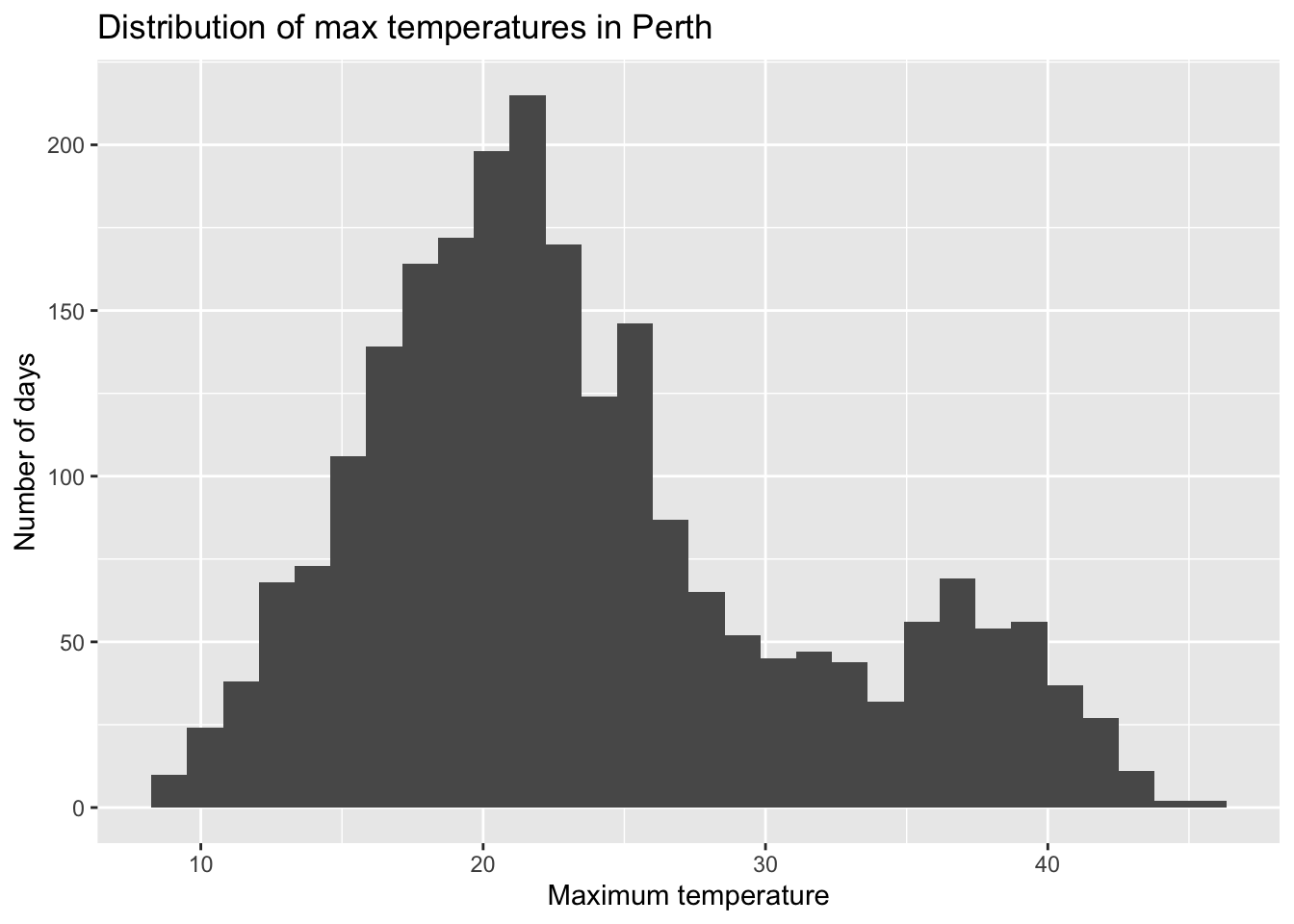
- title the plot “Distribution of max temperatures in Perth”
- change the x-axis label to “Maximum temperature”
- change the y-axis label to “Number of days”
HINT: Do a Google search for something like “add axis labels ggplot”.
# Add a title and axis labels
weather %>%
  ggplot(aes(x = maxtemp)) +
  geom_histogram()
Part b
Check out the ggplot2 cheat sheet. Try making some of the other kinds of univariate plots outlined there.
Part c
What else would you like to change about your plot? Try it!
Exercise 13: Optional challenge
At the top of this activity, we searched for words related to some topics of interest (parents, marriage, money) and combined them into a single theme variable. It looked something like this:
abby_new <- abby %>%
  mutate(
    parents = str_detect(question_only, "mother|mama|mom|father|papa|dad"),
    marriage = str_detect(question_only, "marriage|marry|married"),
    money = str_detect(question_only, "money|finance")
  ) %>%
  rowwise() %>%
  mutate(
    themes = c(
      if (parents) "parents",
      if (marriage) "marriage",
      if (money) "money"
    ) %>% paste(collapse = ", "),
    themes = ifelse(themes == "", "other", themes)
  ) %>%
  ungroup()
Check it out:
head(abby_new)Part a
Understand the code!
Inside
mutate()the lineparents = str_detect(question_only, "mother|mama|mom|father|papa|dad")created a new variable calledparents. This variable takes onTRUEorFALSE. Explain whatTRUEandFALSEmean here.The
themesvariable combines the information from theparents,marriage, andmoneyvariables. Check out thethemesfor the first 3 rows / data points. Convince yourself that you understand how it corresponds to theparents,marriage, andmoneyvariables.
Part b
Beyond parents, marriage, and money, what are some other topics that might pop up in the Dear Abby letters (and that you’re interested in exploring)? Modify the code below to explore those topics! Update the themes variable accordingly.
abby_new <- abby %>%
  mutate(
    parents = str_detect(question_only, "mother|mama|mom|father|papa|dad"),
    marriage = str_detect(question_only, "marriage|marry|married"),
    money = str_detect(question_only, "money|finance")
  ) %>%
  rowwise() %>%
  mutate(
    themes = c(
      if (parents) "parents",
      if (marriage) "marriage",
      if (money) "money"
    ) %>% paste(collapse = ", "),
    themes = ifelse(themes == "", "other", themes)
  ) %>%
  ungroup()

# Check out the raw data
head(abby_new)

# Check out the number of letters belonging to each theme
abby_new %>%
  count(themes)
Solutions
EXAMPLE 1: Background
- Results of brainstorming themes will vary
- From the “Data and Method” section at the end of the Pudding article:
The writers of these questions likely skew roughly 2/3 female (according to Pauline Phillips, who mentions the demographics of responses to a survey she disseminated in 1987), and consequently, their interests are overrepresented; we’ve been unable to find other demographic data surrounding their origins. There is, doubtless, a level of editorializing here: only a fraction of the questions that people have written in have seen publication, because agony aunts (the writers of advice columns) must selectively filter what gets published. Nevertheless, the concerns of the day seem to be represented, such as the HIV/AIDS crisis in the 1980s. Additionally, we believe that the large sample of questions in our corpus (20,000+) that have appeared over recent decades gives a sufficient directional sense of broad trends.
- Writers of the questions are predominately female. The 2/3 proportion was estimated in 1987, so it would be useful to understand shifts in demographics over time.
- What questions were chosen to be answered on the column? Likely a small fraction of what got submitted. What themes tended to get cut out?
EXAMPLE 3: Get to know the data using R code
# How many cases & variables are there?
# First number = number of rows / cases
# Second number = number of columns / variables
dim(abby)
## [1] 514   6
nrow(abby)
## [1] 514

# Print out the first 6 rows
head(abby)
## # A tibble: 6 × 6
##    year month day   question_only                                bing_pos themes
##   <dbl> <ord> <chr> <chr>                                           <dbl> <chr>
## 1  2017 Aug   30    "i moved to the philippines five years ago.…    0.75  paren…
## 2  2017 Aug   30    "under what circumstances do you ask your a…   NA     money
## 3  2017 Aug   28    "i'm not a dog person. i'm not even an anim…    0.333 other
## 4  2017 Aug   28    "my 62-year-old father has recently started…    0.143 paren…
## 5  2017 Aug   27    "i have a friend, \"charlene,\" whom i met …    0.222 other
## 6  2017 Aug   27    "i have been selected to attend a symposium…    0.333 other

# Print out the first 10 rows
head(abby, 10)
## # A tibble: 10 × 6
##     year month day   question_only                               bing_pos themes
##    <dbl> <ord> <chr> <chr>                                          <dbl> <chr>
##  1  2017 Aug   30    "i moved to the philippines five years ago…    0.75  paren…
##  2  2017 Aug   30    "under what circumstances do you ask your …   NA     money
##  3  2017 Aug   28    "i'm not a dog person. i'm not even an ani…    0.333 other
##  4  2017 Aug   28    "my 62-year-old father has recently starte…    0.143 paren…
##  5  2017 Aug   27    "i have a friend, \"charlene,\" whom i met…    0.222 other
##  6  2017 Aug   27    "i have been selected to attend a symposiu…    0.333 other
##  7  2017 Aug   27    "i am the mother of a large family. on sun…    0.5   paren…
##  8  2017 Aug   26    "my daughter will turn 6 soon, and she is …    0.571 other
##  9  2017 Aug   26    "i feel uncomfortable when people end conv…    0.333 other
## 10  2017 Aug   25    "i am the mother of two teenaged girls (13…    0.1   paren…

# Print out the names of the variables / columns
names(abby)
## [1] "year"          "month"         "day"           "question_only"
## [5] "bing_pos"      "themes"
EXAMPLE 5: Data wrangling with select and summarize
# select specific columns of interest
abby %>%
  select(themes, bing_pos) %>%
  head()
## # A tibble: 6 × 2
##   themes            bing_pos
##   <chr>                <dbl>
## 1 parents, marriage    0.75
## 2 money               NA
## 3 other                0.333
## 4 parents              0.143
## 5 other                0.222
## 6 other                0.333

# Calculate the mean of the bing_pos scores
abby %>%
  summarize(mean(bing_pos))
## # A tibble: 1 × 1
##   `mean(bing_pos)`
##              <dbl>
## 1               NA

# Remove NAs (missing data) from the mean calculation
# Name the mean calculation "mean"
abby %>%
  summarize(mean = mean(bing_pos, na.rm = TRUE))
## # A tibble: 1 × 1
##    mean
##   <dbl>
## 1 0.365
EXAMPLE 6: Exploring themes & sentiment
- table of counts
- bar plot
- mean, median
- var, sd
- histogram, density plot, boxplot
Exercise 1: Categorical variable summaries
abby %>%
  count(themes)
## # A tibble: 8 × 2
##   themes                       n
##   <chr>                    <int>
## 1 marriage                    75
## 2 marriage, money              5
## 3 money                       21
## 4 other                      234
## 5 parents                    127
## 6 parents, marriage           33
## 7 parents, marriage, money     4
## 8 parents, money              15

# Set up a blank "canvas" with axis labels
abby %>%
  ggplot(aes(x = themes))
# Add bars
abby %>%
  ggplot(aes(x = themes)) +
  geom_bar()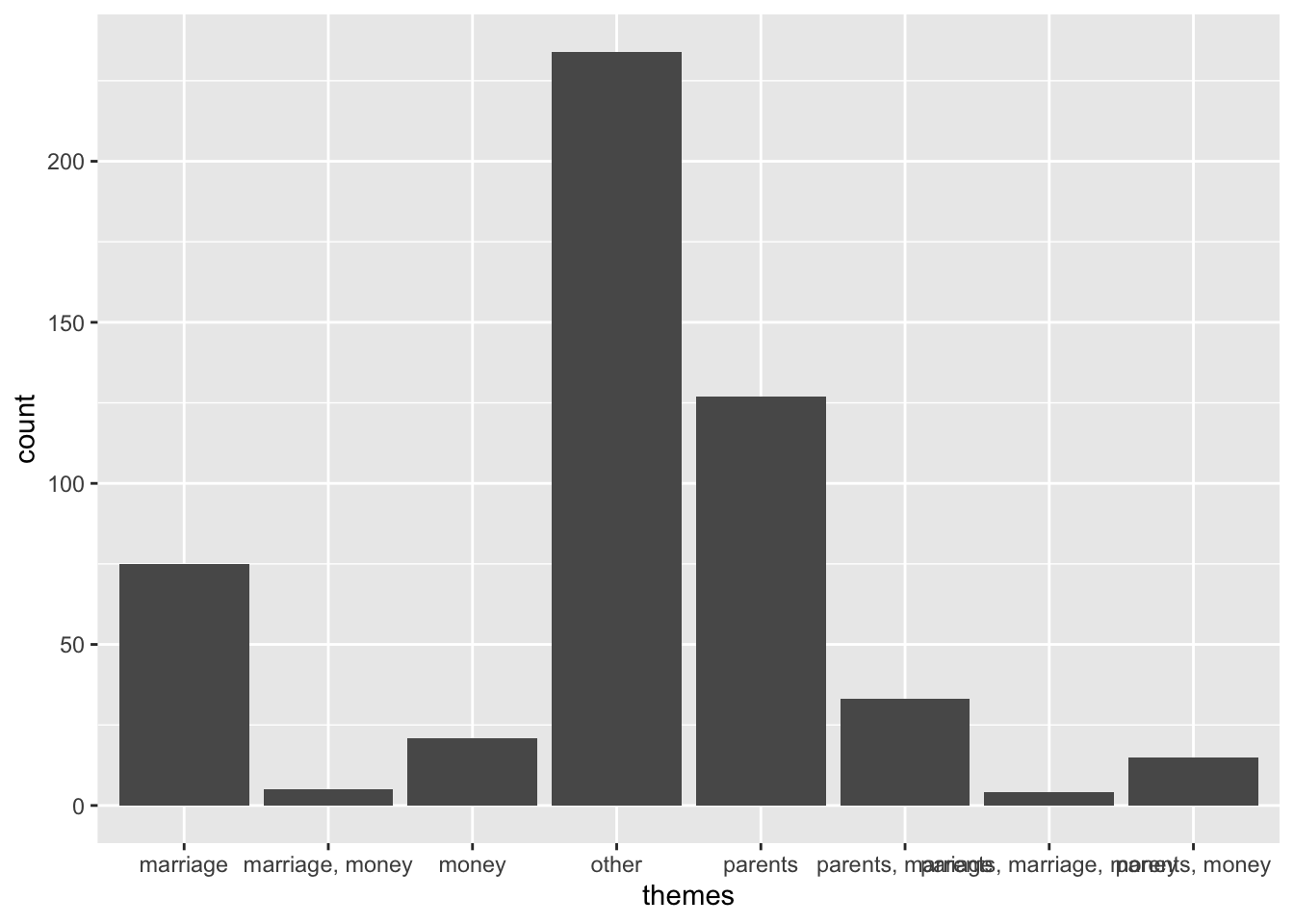
# Rotate the x axis labels
abby %>%
  ggplot(aes(x = themes)) +
  geom_bar() +
  theme(axis.text.x = element_text(angle = 90, vjust = 0.5, hjust = 1))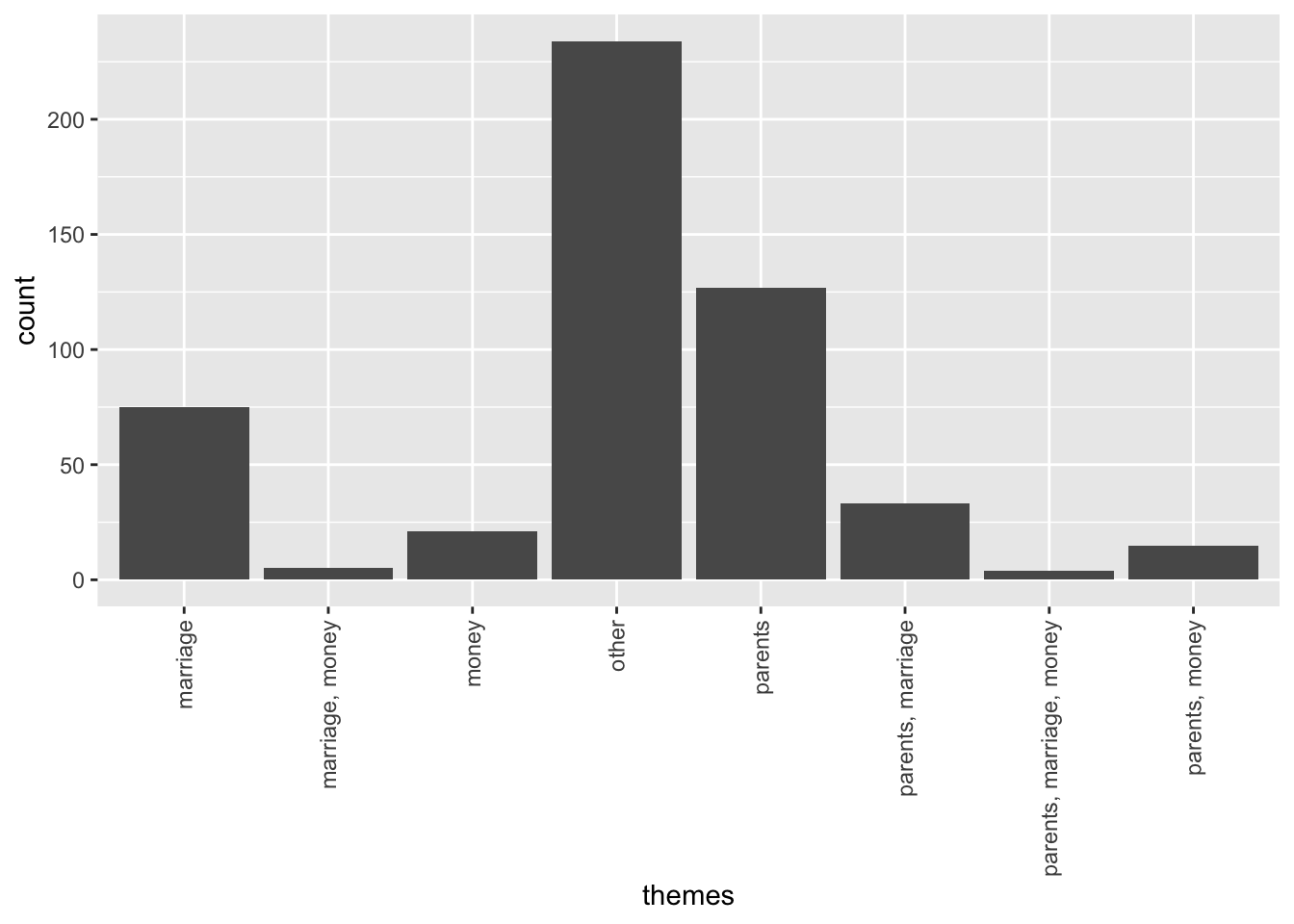
Exercise 2: Numerical summaries for quantitative variables
# What's a typical sentiment?
# Calculate the mean & median (measures of central tendency)
abby %>%
  summarize(mean = mean(bing_pos, na.rm = TRUE),
            median = median(bing_pos, na.rm = TRUE))
## # A tibble: 1 × 2
##    mean median
##   <dbl>  <dbl>
## 1 0.365  0.333

# How varied are the sentiments?
# Calculate the min, max, & sd (measures of spread)
abby %>%
  summarize(minimum = min(bing_pos, na.rm = TRUE),
            maximum = max(bing_pos, na.rm = TRUE),
            stdev = sd(bing_pos, na.rm = TRUE))
## # A tibble: 1 × 3
##   minimum maximum stdev
##     <dbl>   <dbl> <dbl>
## 1       0       1 0.279

# What's the range of the middle 50% of sentiments?
# Calculate the 25th and 75th percentiles (i.e. 1st and 3rd quartiles)
abby %>%
  summarize(first_q = quantile(bing_pos, 0.25, na.rm = TRUE),
            third_q = quantile(bing_pos, 0.75, na.rm = TRUE))
## # A tibble: 1 × 2
##   first_q third_q
##     <dbl>   <dbl>
## 1   0.167     0.5
Exercise 3: Visualizing a quantitative variable – boxplots
# Set up a blank canvas
abby %>%
  ggplot(aes(x = bing_pos))

# Add a boxplot
abby %>%
  ggplot(aes(x = bing_pos)) +
  geom_boxplot()
Exercise 4: Visualizing a quantitative variable – histograms
abby %>%
  ggplot(aes(x = bing_pos)) +
  geom_histogram()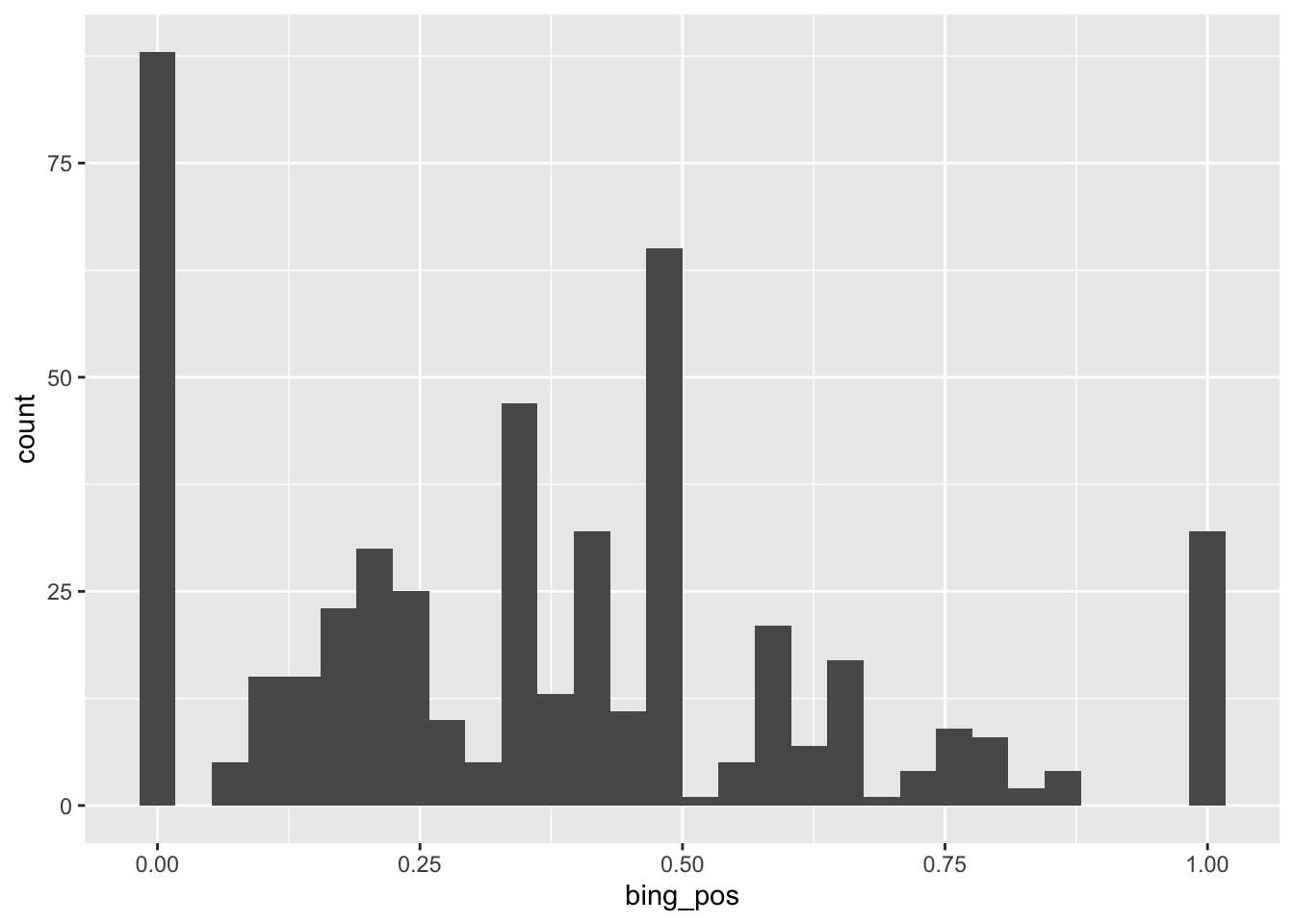
The most common range of bing_pos scores was around 0. Roughly 87 letters scored in this range.
Exercise 5: Visualizing a quantitative variable – density plots
abby %>%
  ggplot(aes(x = bing_pos)) +
  geom_density()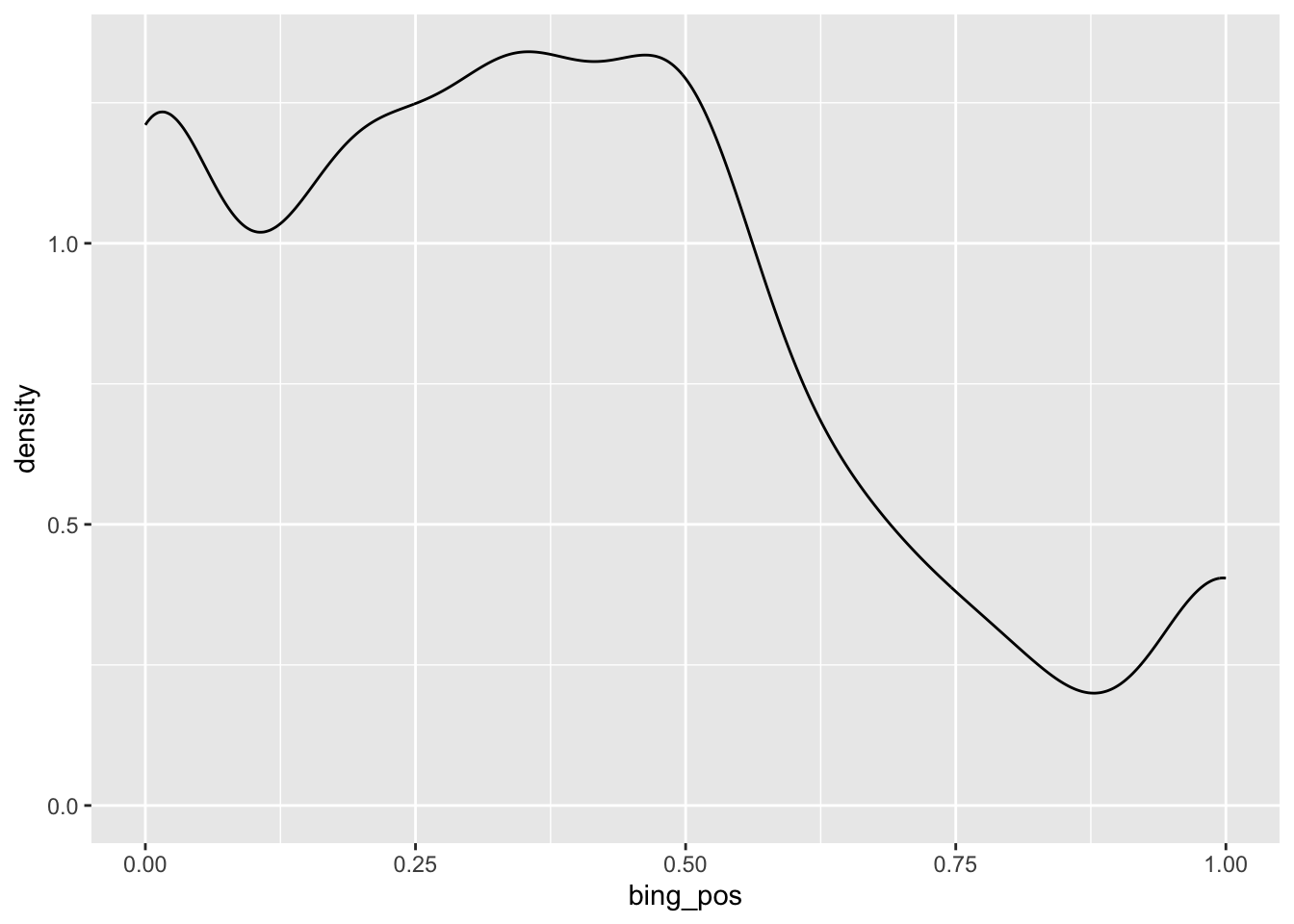
There seem to be 3 types of questions: extremely negative, slightly negative, and extremely positive.
Exercise 6: What did we learn about sentiment?
Part a
In a typical question, 33% of words are positive (meaning questions tend to be negative in nature!). However, there are also clusters of extremely negative questions with (roughly 0% of words being positive) and extremely positive questions with (roughly 100% of words being positive).
Part b
- Boxplots very clearly show key summary statistics like median, 1st and 3rd quartile.
- Boxplots can oversimplify by not showing the shape of the distribution.
- Answers will vary, but the histogram and density plot are more effective than the boxplot in this example!
Exercise 7: Customizing plots
# Recall our histogram
abby %>%
  ggplot(aes(x = bing_pos)) +
  geom_histogram()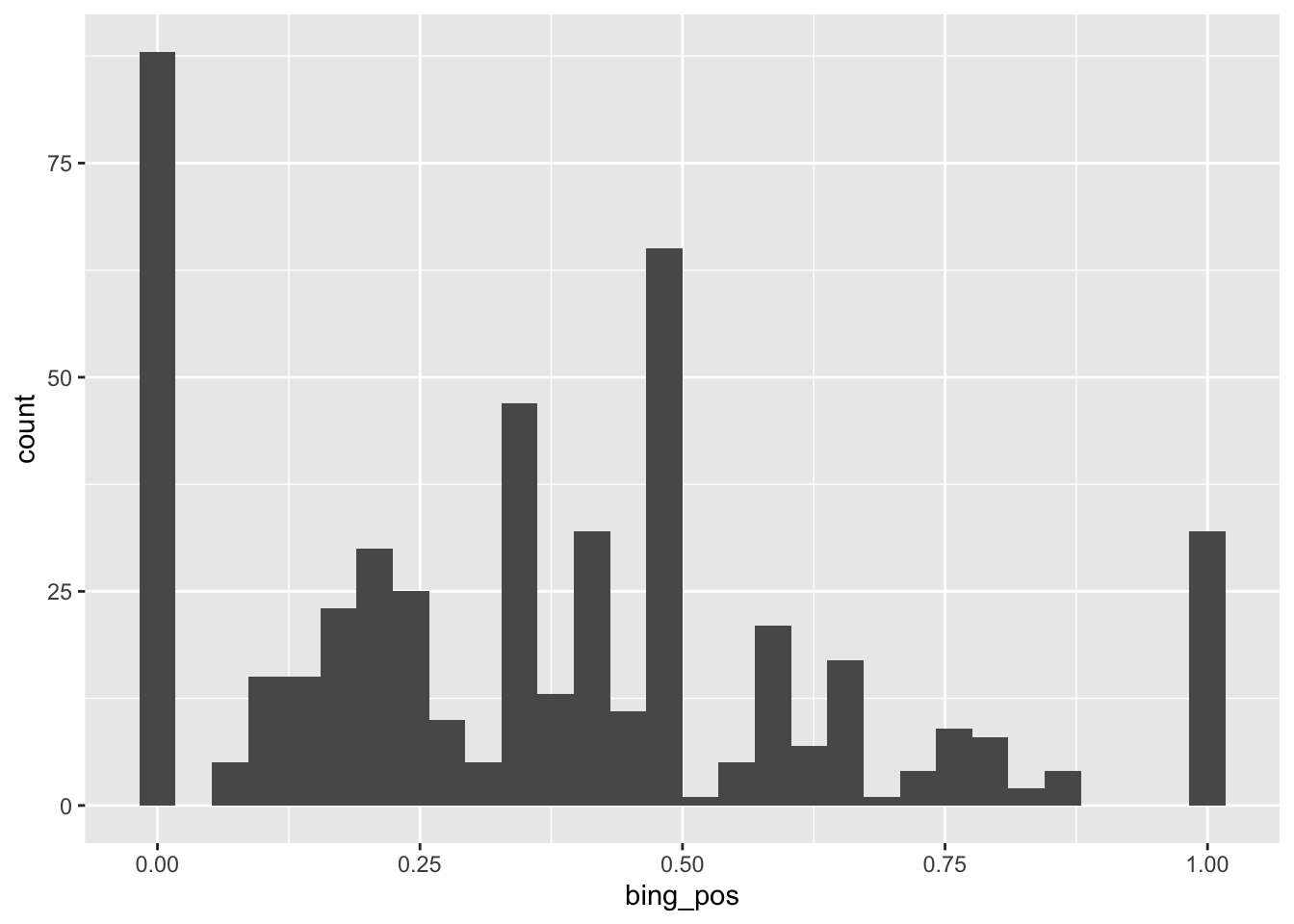
# This adds white lines around the bars.
# It's useful here because it helps distinguish between the bars
abby %>%
  ggplot(aes(x = bing_pos)) +
  geom_histogram(color = "white")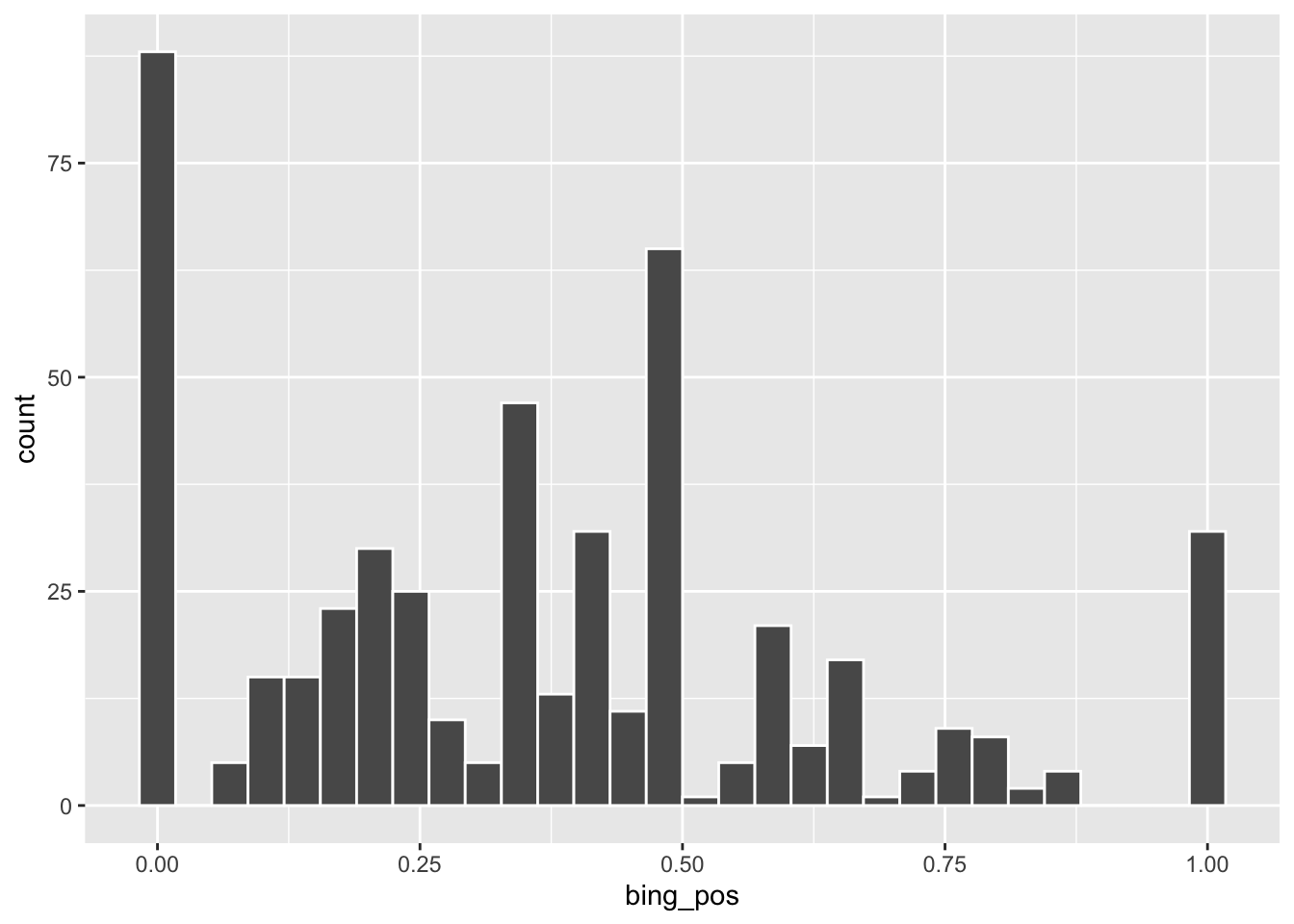
# "color" draws outlines around the bars
# "fill" fills in the bars with color
# This is pretty gratuitous here.
abby %>%
  ggplot(aes(x = bing_pos)) +
  geom_histogram(color = "blue", fill = "orange")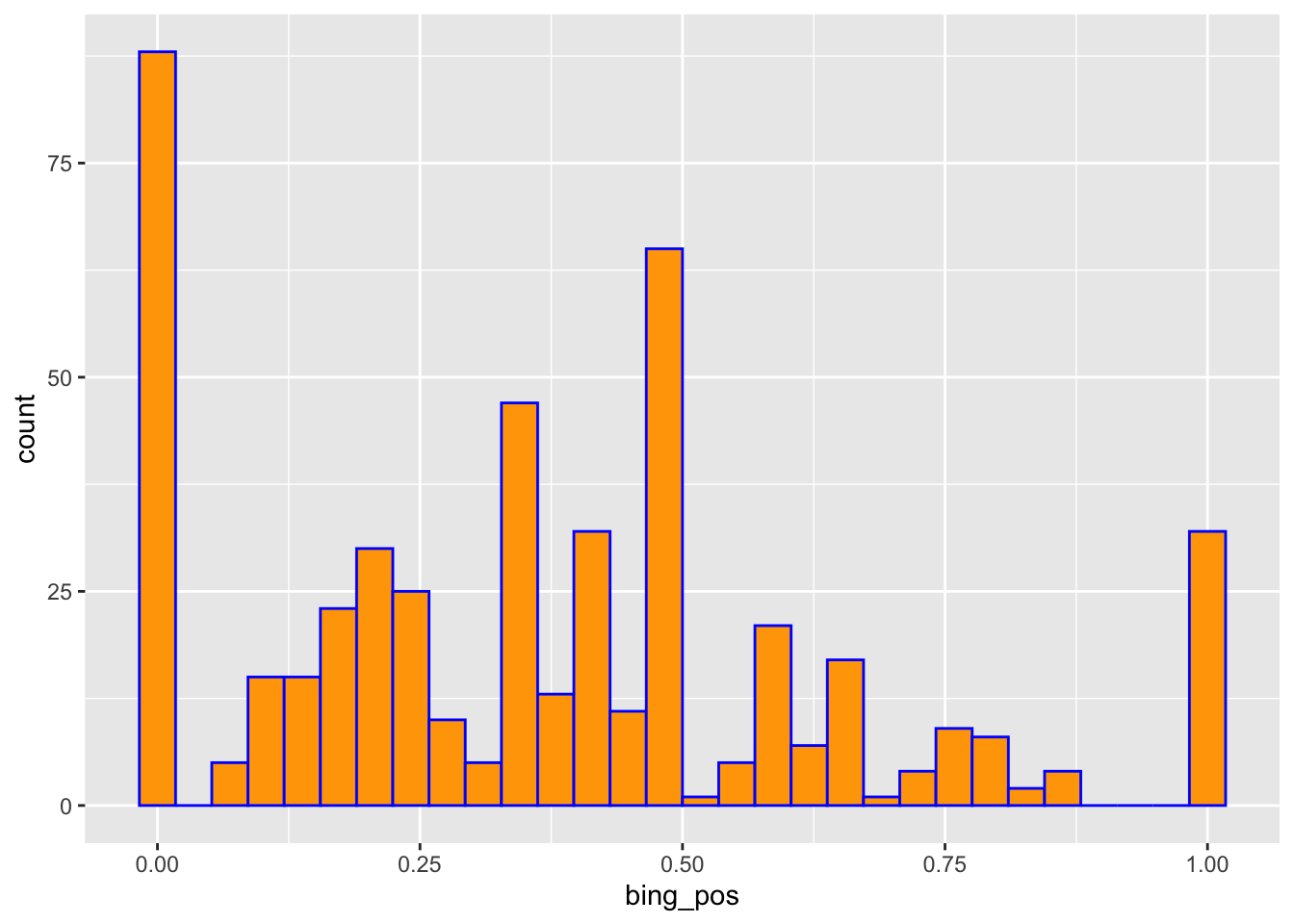
# "color" outlines the density curve
# "fill" fills in the area under the density curve with color
abby %>%
  ggplot(aes(x = bing_pos)) +
  geom_density(color = "blue", fill = "orange")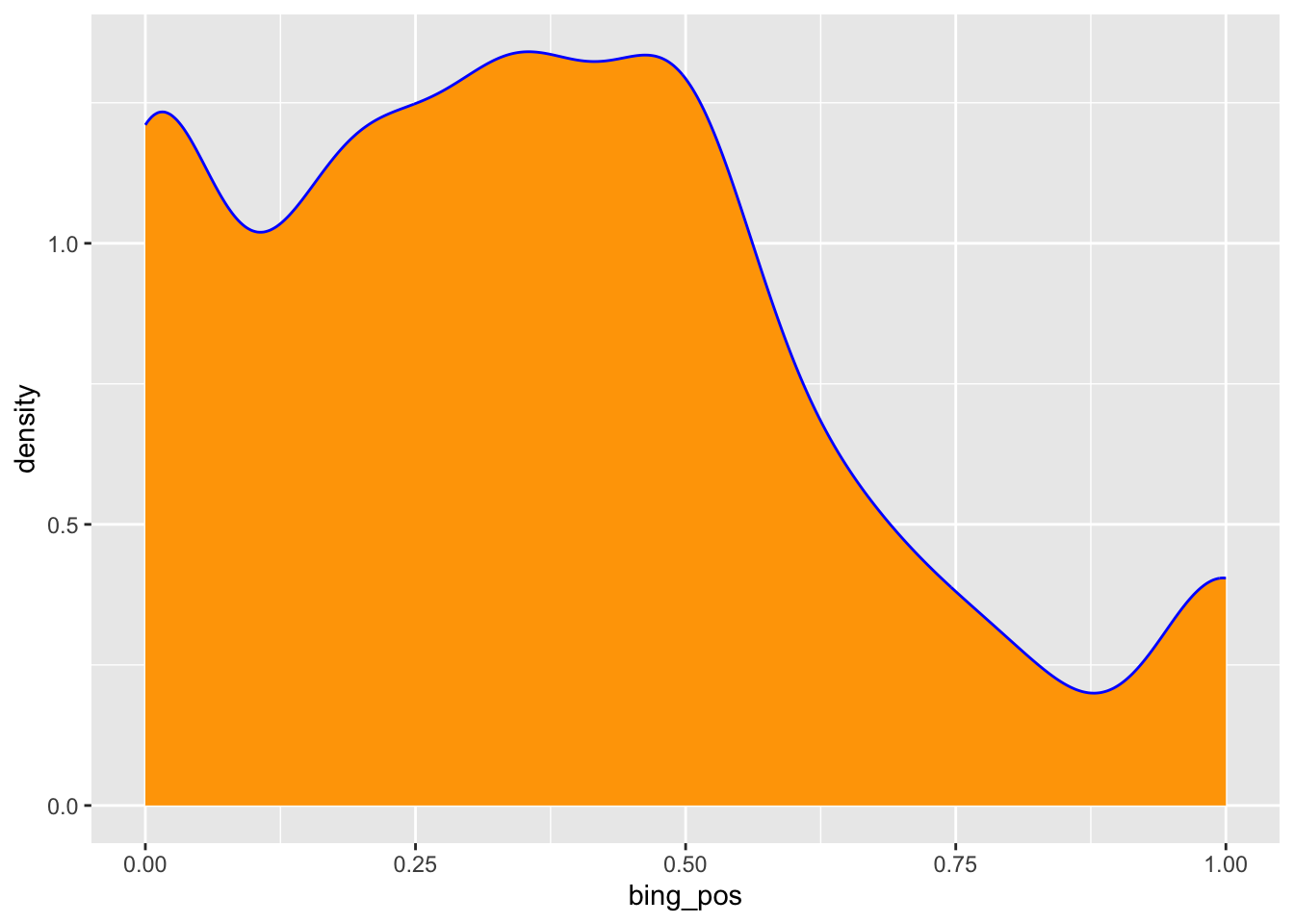
Exercise 8: Looking ahead
Answers will vary.
Exercise 9: Import and get to know the weather data
weather <- read_csv("https://mac-stat.github.io/data/weather_3_locations.csv")

# Examine the first six cases
head(weather)
## # A tibble: 6 × 24
##   date       location  mintemp maxtemp rainfall evaporation sunshine windgustdir
##   <date>     <chr>       <dbl>   <dbl>    <dbl>       <dbl>    <dbl> <chr>
## 1 2020-01-01 Wollongo…    17.1    23.1        0          NA       NA SSW
## 2 2020-01-02 Wollongo…    17.7    24.2        0          NA       NA SSW
## 3 2020-01-03 Wollongo…    19.7    26.8        0          NA       NA NE
## 4 2020-01-04 Wollongo…    20.4    35.5        0          NA       NA SSW
## 5 2020-01-05 Wollongo…    19.8    21.4        0          NA       NA SSW
## 6 2020-01-06 Wollongo…    18.3    22.9        0          NA       NA NE
## # ℹ 16 more variables: windgustspeed <dbl>, winddir9am <chr>, winddir3pm <chr>,
## #   windspeed9am <dbl>, windspeed3pm <dbl>, humidity9am <dbl>,
## #   humidity3pm <dbl>, pressure9am <dbl>, pressure3pm <dbl>, cloud9am <dbl>,
## #   cloud3pm <dbl>, temp9am <dbl>, temp3pm <dbl>, raintoday <chr>,
## #   risk_mm <dbl>, raintomorrow <chr>

# Find the dimensions of the data
dim(weather)
## [1] 2367   24
A case represents a day of the year in a particular area (Hobart, Uluru, Wollongong as seen by the location variable).
Exercise 10: Exploring rainfall
raintodayis categorical (No, Yes)- It is more common to have no rain.
# Visualization
weather %>%
  ggplot(aes(x = raintoday)) +
  geom_bar()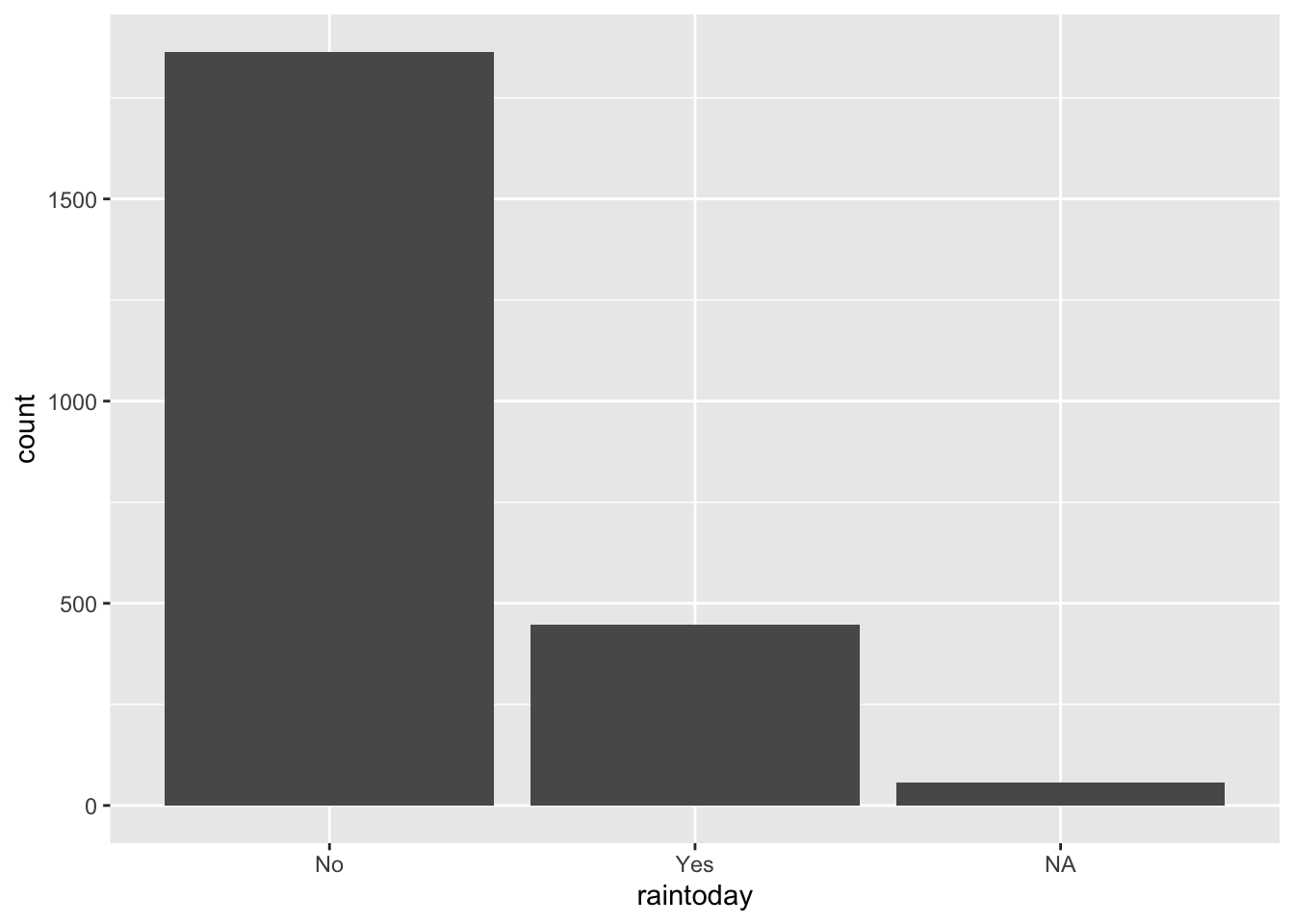
# Numerical summaries
weather %>%
  count(raintoday)
## # A tibble: 3 × 2
##   raintoday     n
##   <chr>     <int>
## 1 No         1864
## 2 Yes         446
## 3 <NA>         57
Exercise 11: Exploring temperature
maxtempis quantitative- The typical max temperature is around 23 degrees Celsius (with an average of 23.62 and a median of 22 degrees). The max temperatures ranged from 8.6 to 45.4 degrees. Finally, on the typical day, the max temp falls about 7.8 degrees from the mean. There are multiple modes in the distribution of max temperature—this likely reflects the different cities in the dataset.
# Visualization (you could also do a boxplot or density plot)
weather %>%
  ggplot(aes(x = maxtemp)) +
  geom_histogram(color = "white")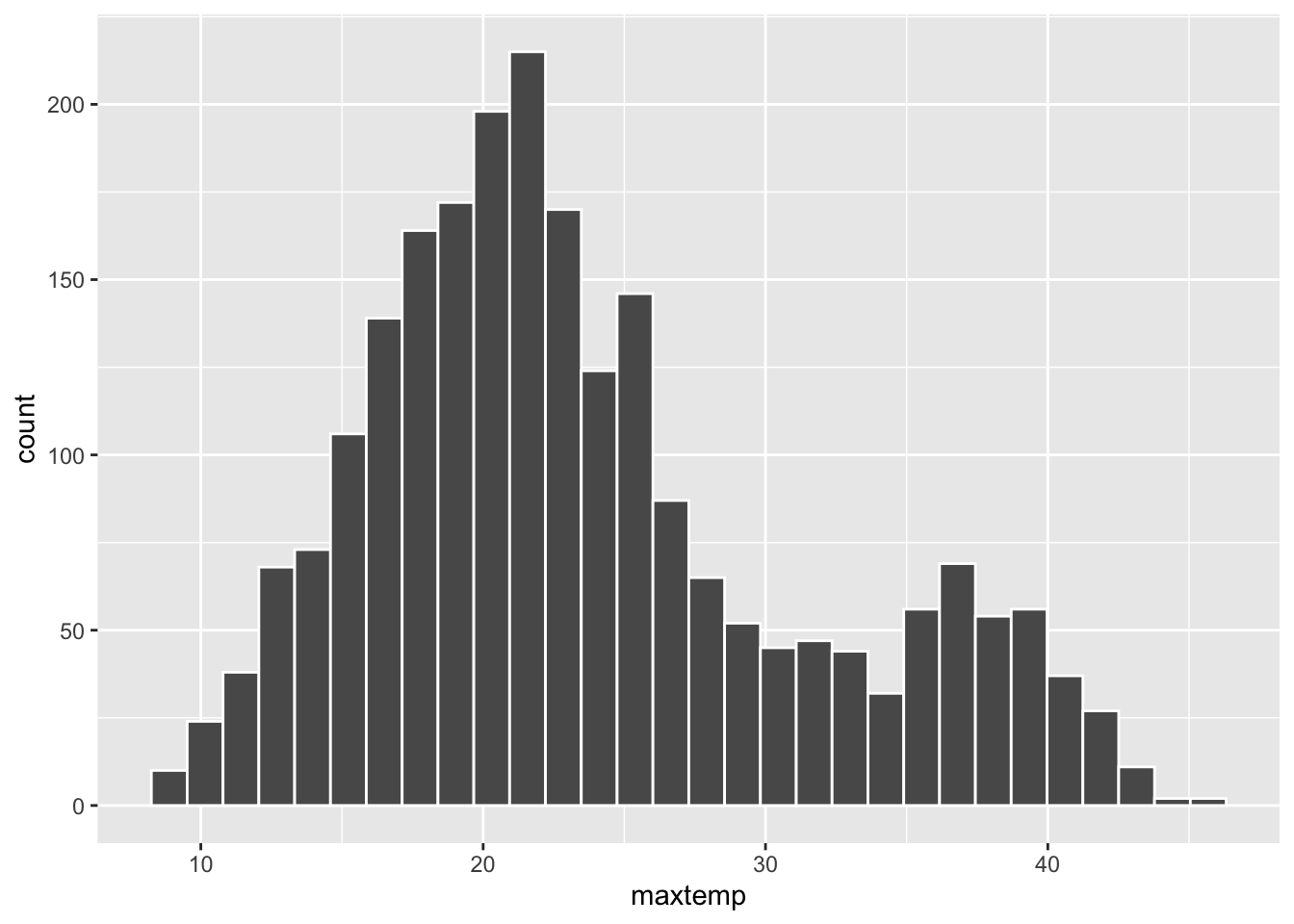
# Numerical summaries - central tendency
weather %>%
  summarize(mean = mean(maxtemp, na.rm = TRUE),
            median = median(maxtemp, na.rm = TRUE))
## # A tibble: 1 × 2
##    mean median
##   <dbl>  <dbl>
## 1  23.6     22

# Numerical summaries - spread
weather %>%
  summarize(min = min(maxtemp, na.rm = TRUE),
            max = max(maxtemp, na.rm = TRUE),
            sd = sd(maxtemp, na.rm = TRUE))
## # A tibble: 1 × 3
##     min   max    sd
##   <dbl> <dbl> <dbl>
## 1   8.6  45.4  7.80
Exercise 12: Customizing! (CHALLENGE)
weather %>%
  ggplot(aes(x = maxtemp)) +
  geom_histogram() +
  labs(x = "Maximum temperature", y = "Number of days", title = "Distribution of max temperatures in Perth")